

WiLife Command Center 2.5
Control video surveillance devices and recordings
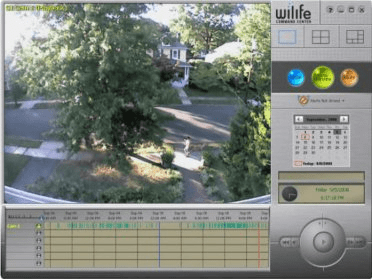
Establish and manage a video surveillance system. Configure multiple cameras and review your video recordings. Check the readings in real time, switch between cameras or display multiple feeds. Change the zoom level, focus on a certain area and memorize the position to five available presets.
Command Center is a Windows application for watching live action, searching the recorded video archive, and setting options. Everything is just a click away.
When you install the software you determine how much space to allow the system to use for video storage and the software automatically manages the disk space by replacing the oldest video with new recordings. By default, Command Center is set to record only motion events. Store months of video on as little as 20 GB of your PC's hard drive.
In Live view, you can watch the front door, driveway, kitchen, backyard, entertainment room, and office all at once.
Watch everything around your home or business as it happens.
In playback view you can access and play video clips from your video archive. Pick any day from a calendar to view a timeline of motion events for that day.
The playback controls allow you to play, pause, step forward & back, and adjust playback speed between super slow and very fast. Playback shows video from all cameras in parallel.
Main features:
- Manage and control up to six cameras
- Save disk space with smart video management
- Create e-mail and cell phone alerts*
- Link to your remote viewing account
- Access online software and camera updates
- Run Command Center in the background with little CPU usage
Details
Extensions

No information available
The data will be available later.Awards

There are no awards
Over time, app awards will appear here.


Comments